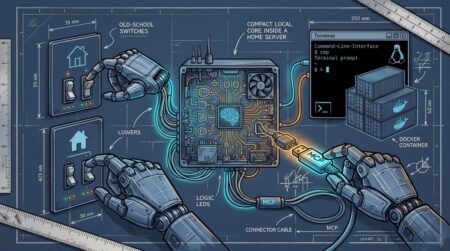






Imagine an assistant that can answer a question about your infrastructure inventory but cannot access your inventory database. You could paste records into every prompt, write a custom integration for each AI application or expose a controlled interface that different applications can discover. The third approach is one of the problems the Model Context Protocol (MCP) addresses.
MCP is a protocol for connecting AI applications to external tools and sources of context. It standardizes communication between an MCP client and an MCP server; it does not grant an AI model unlimited access to every system behind that server.
One question, three components
Consider the request: “Show me the devices in rack R12 that have no recorded owner.” A system designed around MCP might involve:
- Host application: the assistant interface where the user asks the question.
- MCP client: a component of that host that connects to the relevant MCP server and negotiates supported capabilities.
- MCP server: a service that exposes an approved inventory lookup tool and returns structured results.
The actual AI model is not the MCP server. It decides whether a tool could help; the host and its policies determine how the request is executed, what permissions apply and which results are shown.
Tools, resources and prompts are different things
| Primitive | Typical purpose | Example |
|---|---|---|
| Tool | Execute a bounded operation | Look up assets by rack ID |
| Resource | Supply data or context | Read a schema document or inventory snapshot |
| Prompt | Provide a reusable interaction template | Checklist for planning a maintenance change |
A tool might read data, modify a ticket or run a query. Permissions should be designed around its actual behavior. A read-only inventory lookup and a production configuration change must not share the same approval policy.
What the exchange looks like conceptually
The protocol uses JSON-RPC messages. At a high level, a client discovers capabilities and can request the available tools. A simplified illustrative tool descriptor could look like this:
{
  "name": "find_unowned_assets",
  "description": "List unowned devices in one rack",
  "inputSchema": {
    "type": "object",
    "properties": {
      "rackId": { "type": "string" }
    },
    "required": ["rackId"]
  }
}
This object is an illustration of tool metadata, not a complete standalone MCP server. A real implementation must satisfy the applicable protocol version, transport, lifecycle and authorization requirements.
When the user asks about rack R12, the application can submit arguments for that tool. The server should validate rackId, authorize the caller, query an approved backend and return only the fields needed to answer.
Why MCP is useful – and what it does not solve
Without a shared interface, each AI application may require a bespoke connector for every data system. An MCP server can make one carefully scoped capability available to multiple compatible clients. This is valuable for tools and context retrieval, particularly when teams want to replace fragile prompt-based workarounds with structured requests.
However, MCP is not itself a database, a vector store, a language model or a security boundary. A badly designed MCP server can expose sensitive information just as readily as a badly designed REST API.
If the real need is to search internal documents and supply passages to a model, you may also need retrieval-augmented generation (RAG). Our RAG deployment guide covers that separate architectural concern.
Security review before enabling an MCP server
Tool calling brings actions into a conversation. Treat every tool output and every user-supplied tool argument as untrusted until validated.
- Identity: authenticate the calling application and bind it to a known user or service principal.
- Authorization: authorize each tool and operation independently, ideally on the backend where the data resides.
- Scope: prefer a small set of read-only tools initially. Do not expose generic shell execution or unrestricted database queries to an assistant.
- Input validation: validate structured fields, enforce limits and reject unsupported operations.
- Secrets: keep credentials on the server side; never include them in tool descriptions or model-visible responses.
- Prompt injection: external documents and tool results may contain instructions aimed at the assistant. They are data, not authoritative instructions.
- Auditability: log which identity invoked which tool, when, and whether the request succeeded without collecting unnecessary sensitive content.
For actions that change infrastructure, add explicit user confirmation and a separate approval layer. A conversational “yes” should not bypass the permissions already enforced by your systems.
MCP or a custom API integration?
Choose MCP when you want standardized discovery of tools and data across several AI applications. A conventional API integration may be simpler for one tightly controlled application. They are not mutually exclusive: an MCP server often calls existing REST or GraphQL APIs behind the scenes.
Before implementation, write down four things: which user is asking, what data they should see, what actions they may take and what the system logs. Those answers matter more than whether the connector is labeled MCP.
Authoritative references: MCP specification and architecture overview. MCP is evolving, so check the version supported by both your client and server.