






Once a Storage Scale cluster is healthy, creating a filesystem introduces decisions about which disks participate, who owns them and what failure patterns the deployment should tolerate. These decisions must be settled before running commands that initialize shared storage.
Inventory the disks
Identify every intended network shared disk by a stable identifier and confirm that no disk contains a filesystem or application data you need. An NSD definition should match the actual server and failure-domain design; accidental disk selection can destroy data.
Define NSDs using the supported release
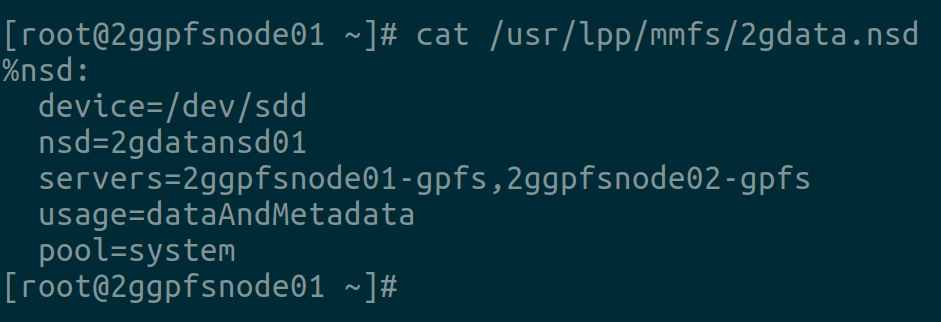
Create an NSD stanza for the exact Storage Scale version you operate. Verify that primary and secondary NSD servers, disk roles and device names are correct. Use IBM's current documented command syntax instead of copying examples across releases.
Set filesystem properties
Select block size, metadata and data replication, failure groups and mount options based on workload and redundancy requirements. A filesystem with default settings is not automatically appropriate for a multi-node production cluster.
Verify and operate
After creating the filesystem, inspect its properties and health, mount it on an intended node and perform read/write tests with noncritical data. Check that access from other nodes behaves as designed. Schedule backups and health monitoring independently of replication.
A staged filesystem acceptance test
Begin with a dedicated test NSD and nonproduction data. Verify that the filesystem mounts on the intended nodes and that ownership and permissions behave consistently. Check metadata operations with many small files as well as a large sequential file. Then simulate one expected failure under controlled conditions and verify the filesystem's response. Only after confirming monitoring, backups and recovery should you use the layout for important data.
Related reading
Continue with planning a Storage Scale cluster.
Primary documentation: https://www.ibm.com/docs/en/storage-scale. Confirm the relevant release and hardware before applying changes to a production system.

